Connected in about five minutes
TAP connects through a read-only Expert Advisor that runs in your own terminal — so there’s no investor password to hand over and no broker to wait on. Here’s exactly what happens, and exactly what the EA can and cannot see.
1. Download the TAP Sync EA
Grab the MT4 (.ex4) or MT5 (.ex5) build from your dashboard and drop it into your terminal’s Experts folder — the same place any EA lives.
2. Allow the TAP URL in WebRequest
In MetaTrader, Tools → Options → Expert Advisors → “Allow WebRequest for listed URL” and add the TAP address. This is the one permission the EA needs; the wizard shows the exact screen.
3. Attach the EA and paste your pairing code
Drag the EA onto any chart, paste the one-time code from your dashboard, and the terminal pairs itself. No login, no investor password.
4. Watch the backfill
The EA imports your closed-trade history once (“Importing 1,204 trades… 63%”), then keeps streaming live. MT4 users just enable “All History” first — the wizard reminds you.
5. Your dashboard fills in
Equity curve, calendar, costs and reports populate from real fills — and three instant insights greet you on arrival.
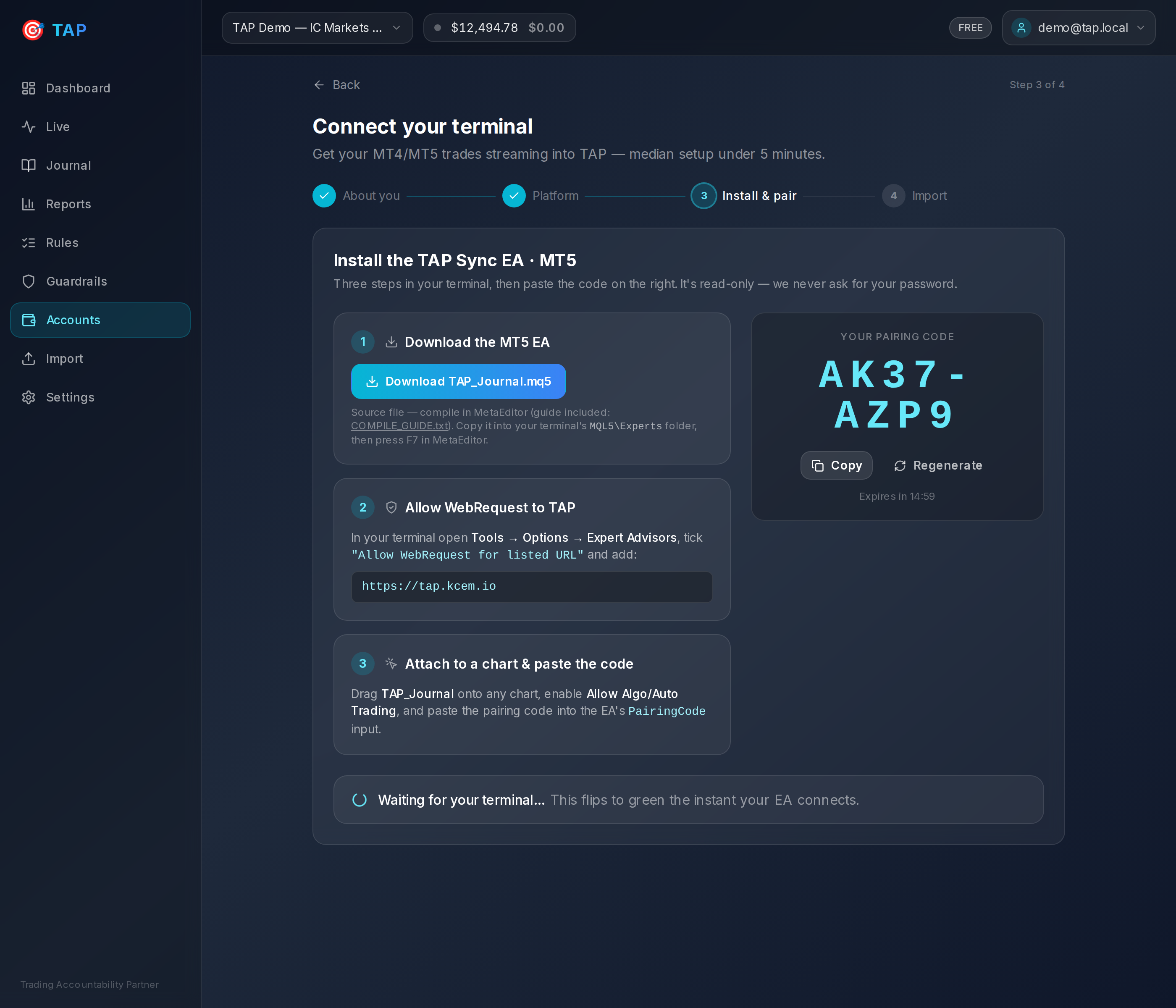
The in-app connect wizard — demo data
Why the WebRequest permission?
MetaTrader sandboxes network access: an EA can only reach a URL you’ve explicitly allow-listed under Expert Advisors → “Allow WebRequest”. That single setting is how the TAP Sync EA sends its read-only reports to your account.
Outbound HTTPS from the EA to TAP — heartbeats, trade events and the one-time history backfill. That’s the whole surface.
It grants no trading rights and no access to your broker login. WebRequest can’t place orders — only the terminal can, and this EA never asks it to.
Exactly what data is collected
No vague promises. Here is the full list.
Collected
- Account metrics: balance, equity, margin, currency, leverage, broker server time offset
- Open positions: symbol, direction, volume, entry, current price, SL/TP, floating P&L
- Closed trades / executions: fills with price, volume, profit, commission and swap
- Instrument specs the EA sees (digits, pip size, contract size) — so pip math is correct
Never collected
- Your broker password — investor or master. None is ever entered or stored.
- The ability to place, modify or close trades. The EA has no order functions.
- Anything outside the terminal it’s attached to. No files, no keystrokes, no other apps.
Ready to connect?
Create a free account and the connect wizard walks you through every step above.